
Text to Speech WordPress Plugin – Audio Player & Listen Button for Posts and Pages
Turn Your WordPress Content into Natural-Sounding Speech.
Let visitors listen to your articles instead of reading them. Start free with browser voices and a customizable WordPress audio player, then upgrade to Pro for natural AI voices, stored audio files and listening statistics.
Interactive sample · Click play to hear natural browser speech
See How the Audio Player Looks on Your Blog
Press play below to try out different playback speeds, toggle light and dark themes, and see how easy it is for your visitors to listen.
Why Listening to Blog Posts is the Future of Web Content
Click play to start hands-free voice narration
Imagine opening your favorite blog and, instead of straining your eyes on a bright screen, you simply press Play.
A smooth, friendly voice begins reading the story with warmth and perfect pacing. You can finish your morning coffee, fold laundry, or drive to work while soaking in valuable knowledge.
Websites that offer audio narration keep visitors three to five times longer. Search engines like Google take notice of this engagement and push the website higher up in rankings.
Key Features Designed for Better Listening
Everything you need to give your WordPress content an interactive, natural voice experience without complex setups.
Natural AI Voice
Listen with natural-sounding voices.
Visitor's built-in browser voices in the Free plugin with zero configuration, or natural neural AI voices from OpenAI, ElevenLabs, Amazon Polly, Google Cloud, Azure, and Ollama in Pro.
Audio Player
Beautiful audio player for posts.
Clean, responsive audio player with 5 playback speeds (0.75x, 1x, 1.25x, 1.5x, 2x), progress bar, elapsed time, volume and mute controls.
Listen Button
One-click listening experience.
One-click play above or below post content automatically, or place it anywhere on posts, pages, and custom post types using shortcodes.
Customizable Player
Customize the player appearance.
Choose from 4 player themes (Clean White, Dark Modern, Compact Mini-Bar, Soft Card), custom brand colors, title, border radius, and layout alignment.
Explore Detailed Features
Compare the rich feature set included in the Free plugin and the Pro add-on
Browser voices read your posts aloud with no API key, cloud speech account or subscription. Pick a woman, man or device default voice and test it from the settings page.
Play and pause, see playback progress and time, adjust the volume or mute, and choose from five speeds: 0.75x, 1x, 1.25x, 1.5x and 2x.
Choose Clean White, Dark Modern, Compact Mini-Bar or Soft Card.
Set the accent, background, text, track and border colors, add your own player title, and adjust the size, maximum width, alignment and border radius.
Show the player above or below your content on any public post type you select (posts only, by default), or add it anywhere with [ai_tts_player] or [kudometrics_player].
See each post's audio status (Not Generated, Ready, Outdated or Failed) in the block editor or Classic editor, with a Generate Audio button.
Connect OpenAI, ElevenLabs, Google Cloud Text-to-Speech, Microsoft Azure Speech, Amazon Polly or self-hosted Ollama using your own API credentials.
Generate an audio file for each article and store it on your WordPress site, in Amazon S3 or in Cloudflare R2, with a connection test for cloud storage.
Queue all your published articles in one click from the Bulk Queue tab with a progress bar and Stop Queue button, skipping posts whose audio is already current.
Turn on Automatic Audio on Update and Pro creates fresh audio when you edit a published article and its content has changed.
See total listens and the plays for each post in a Top Narrated Posts list to know which content resonates most with listeners.
Test your connection to each speech service, and your S3 or R2 upload, before you generate any audio across your website.
How It Works in 3 Simple Steps
Get your WordPress blog speaking to visitors in minutes without writing a single line of code.
Install and activate
Install KudoMetrics AI Text to Speech from WordPress.org or directly from your WordPress Plugins menu with zero API keys required.
Configure voice and player settings
Choose a theme, colors, and layout. Pick above or below content placement, select your public post types, and test voices right in settings.
Visitors click Listen and enjoy your content
Visitors press Play to listen to your posts, change playback speed from 0.75x to 2x, and adjust volume on any device.
Zero programming required. Works seamlessly out of the box with default browser voices or your own AI API keys.
See the Plugin in Action
Actual screenshots from WordPress admin settings, audio player styling, and frontend post listening.
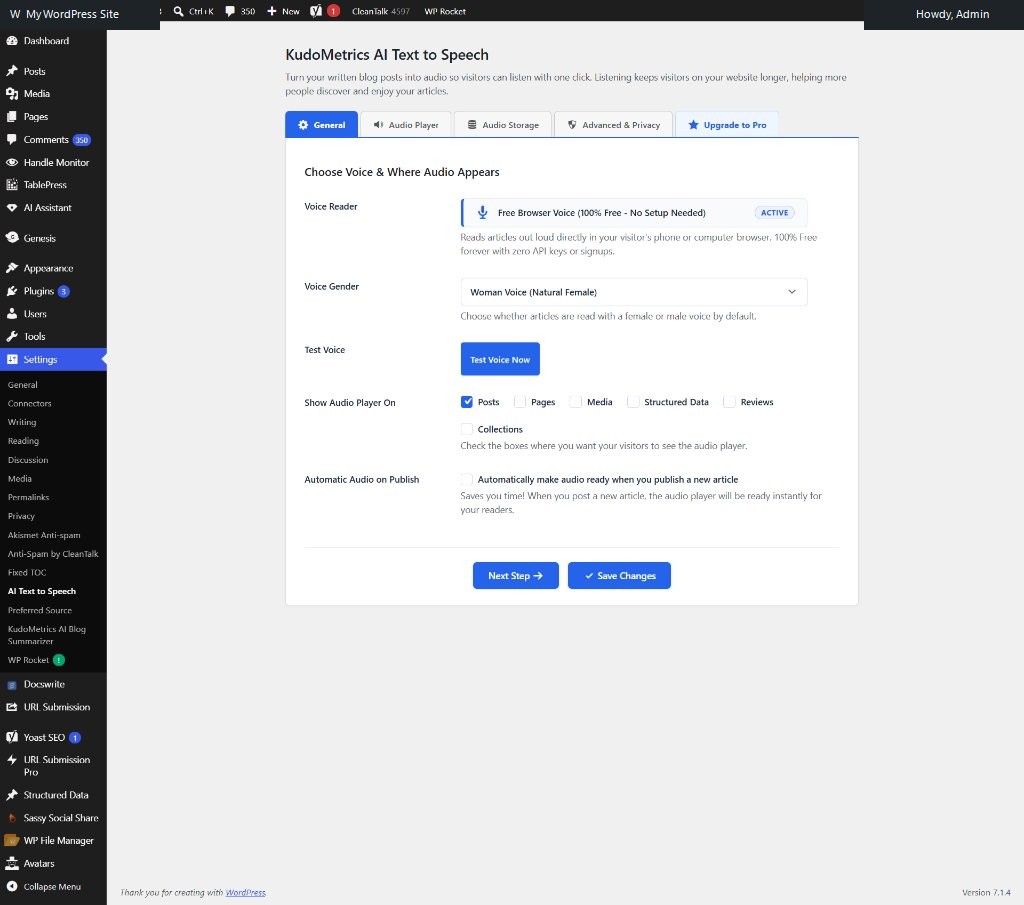
Manage all audio settings directly inside WordPress admin. Choose which public post types display the player, pick default voices, and test audio playback instantly.
Visitors stay over 3 times longer when listening to audio narration.
Turn it on and the audio player appears automatically on your posts.
Zero slowdown for Google PageSpeed and Core Web Vitals.
Readers can listen at 0.75x, 1x, 1.25x, 1.5x, or 2x speed.
Built for Accessibility, Performance & Reader Growth
Five solid reasons publishers, agencies, and bloggers trust KudoMetrics to narrate their articles.
Better reading accessibility
Empower visitors with dyslexia, visual impairments, or reading difficulties to enjoy your long-form articles effortlessly.
Improved user experience
Readers can listen while driving, commuting, cooking, or exercising, significantly increasing page stay and audience loyalty.
Easy integration
100% compatible with Gutenberg block editor, Classic editor, and all major WordPress themes (Astra, GeneratePress, Divi, Elementor).
Lightweight performance
Ultra-lean footprint with zero heavy scripts. Maintains lightning-fast page loading and excellent Google Core Web Vitals scores.
Reliable support
Clean codebase developed with modern WordPress best practices, privacy-first data handling, and friendly ongoing support.
Who Is It Built For?
Bloggers & Publishers
Give readers a way to listen to long articles while they commute, cook, or work.
News & Magazine Sites
Use Pro to generate consistent AI narration across your archive with bulk generation.
Agencies & Developers
Add a branded audio player to client sites without writing custom code.
Free vs Pro: Which Version Do You Need?
Choose Free if you want a simple listen option using your visitors' browser voices at no cost. Choose Pro if you want natural AI voices, real audio files, cloud storage, bulk generation, and listening statistics.
| Feature | Free Community $0 Free Forever | Pro Add-on From $49 / year |
|---|---|---|
| Browser text to speech | ✓ | ✓ |
| Player controls and five playback speeds | ✓ | ✓ |
| Four themes and custom colors | ✓ | ✓ |
| Automatic placement and shortcodes | ✓ | ✓ |
| Editor audio management | ✓ | ✓ |
| AI voices (OpenAI, ElevenLabs, Google Cloud, Azure, Amazon Polly, Ollama) | — | ✓ |
| Generated audio files | — | ✓ |
| Amazon S3 and Cloudflare R2 storage | — | ✓ |
| Bulk audio generation | — | ✓ |
| Regenerate audio after edits | — | ✓ |
| Listening statistics | — | ✓ |
| Where to get it | WordPress.org | KudoMetrics |
Six AI Speech Services Supported
| Speech Service | What You Set Up |
|---|---|
| OpenAI | API key, model (TTS-1 or TTS-1-HD) and voice |
| ElevenLabs | API key, model and voice |
| Google Cloud Text-to-Speech | API key and voice name |
| Microsoft Azure Speech | Speech key, region and voice |
| Amazon Polly | AWS access key, secret key, region and voice |
| Ollama / self-hosted | Endpoint URL and model name |
Pro Pricing Plans
Every paid plan includes the same Pro features. Plans differ only by the number of sites you can use Pro on. Pro is an add-on, so the free plugin must be installed on each site.
Free
1 WordPress Site (No Paid Activation)Listen with browser voices and a customizable player with zero setup.
- Visitor's built-in browser voices
- No API key or external account needed
- Clean audio player with 4 themes
- 5 playback speeds (0.75x to 2x)
- Automatic placement above or below content
- Shortcodes [ai_tts_player] & [kudometrics_player]
- WordPress block & Classic editor status badge
Starter
1 Licensed WordPress SiteAdd natural AI voices and stored audio files to your blog or personal site.
- 1 Licensed WordPress Site
- 6 AI speech services (OpenAI, ElevenLabs, Polly, Google, Azure, Ollama)
- Real MP3 audio files generated and stored
- Amazon S3 & Cloudflare R2 cloud storage
- Automatic audio regeneration after post edits
- Bulk audio generation with progress bar
- Listening analytics & Top Narrated Posts
- 1 year of automatic updates & priority support
Growth
Up to 5 Licensed SitesGreat for creators, publishers, and niche site builders with multiple websites.
- Up to 5 Licensed WordPress Sites
- All Starter features included on every site
- 6 AI speech services across all 5 sites
- Amazon S3 & Cloudflare R2 cloud storage integration
- Bulk audio generation with progress tracking
- Automatic audio regeneration on post update
- Listening stats & per-article play counts
- Centralized license activation & VIP support
Agency
Up to 25 Licensed SitesDesigned for web agencies, developers, and media networks managing client sites.
- Up to 25 Licensed WordPress Sites
- All Pro features included on all sites
- 6 AI speech services & cloud storage connections
- Bulk queue processing for extensive article archives
- Automatic regeneration when client edits posts
- Aggregated play counts & listening analytics
- Client domain management in KudoMetrics portal
- Priority fast-track engineering support
Annual billing is paid upfront. Activating a license sends your license key and site URL to KudoMetrics. Speech service and storage charges (OpenAI, ElevenLabs, Amazon S3 and so on) are paid to those providers separately because you use your own accounts.
Frequently Asked Questions
Answers to common questions about voice quality, setup steps, theme compatibility, and speech service accounts.
Make Your WordPress Content Listen-Ready!
Add a listen button to your posts today, for free. Upgrade to AI voices and stored audio whenever you're ready.
Disclaimer: KudoMetrics AI Text to Speech and AI Text to Speech Pro are independent WordPress plugins and are not affiliated with, endorsed by, or sponsored by OpenAI, ElevenLabs, Google, Microsoft, Amazon, Cloudflare or Ollama. Voice quality and availability depend on the speech service, model, device and browser. Third-party speech and storage services may charge separately. The plugins do not guarantee search rankings, time on page or other engagement results.